Buying a CRM
The best CRM for a small business is not the top-rated one
Quick answer: There is no best CRM for small business, because the rankings measure the tool and your decision depends on your team. The one that wins a review scores on features, which every CRM has. The one that works for you scores on three things a review cannot see: whether it does your three jobs, whether your least enthusiastic seller keeps logging in month four, and what it costs to leave. Skip the ranking. Run six gates and four weighted criteria on your own shortlist. Usually two questions decide it.
What a ranking measures
Open any "best CRM for small business" list and read the criteria. Ease of use. Features. Value. Integrations. Customer support. Every entry scores between 4.2 and 4.7 out of five, the winner changes with the year and the affiliate deal, and the top three are the same three products with the biggest marketing budgets. That is not dishonesty. It is what a ranking can measure: the product, on its own, judged by someone whose business is reviewing products.
Your decision does not depend on the product on its own. It depends on the product against your three jobs, your sellers, your inbox, your contact count and your appetite for a renewal clause. None of that is in the review, because none of it is available to the reviewer.
What actually decides it
Ask anyone who has bought a CRM twice what went wrong the first time. It is never "it lacked features." It is one of three things. The tool did not quite do the one job they bought it for, so someone built a workaround, and the workaround became the system. Or the sellers stopped logging around month four, because logging was harder than not logging, and the pipeline quietly became fiction. Or they found out at renewal what the export did not include, and paid the increase.
The job. The adoption. The exit. Every one of those is invisible on a feature page and visible in a week of testing on the trial with your own data. So the method weights them 5, 4 and 4, and puts price last at 3, because price was the one thing you were always going to look at.
The method, in one page
Before you look, write the shape: the three jobs the CRM must do on a normal Tuesday, who uses it daily, seats in eighteen months, the annual ceiling all-in, which email and calendar, where contacts live now, the one report the owner needs monthly, and who signs.
Then run gate 0: one seller, under 300 active contacts, nobody has waited for a pipeline answer. Three yeses means a spreadsheet with a Next Action column, not a CRM. Then pick the rung: spreadsheet, inbox add-on, standalone CRM or suite, and compare tools on that rung only.
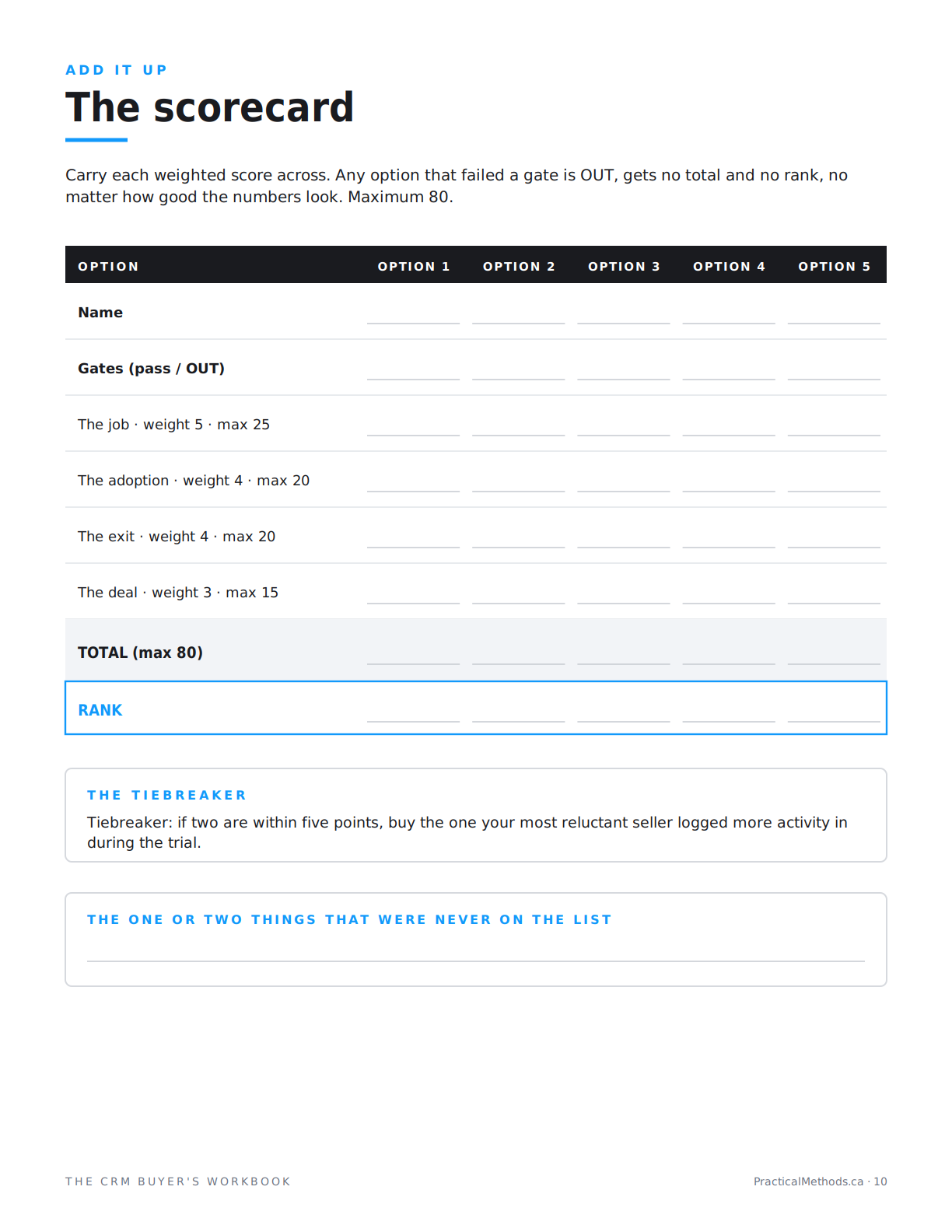
Then six gates, pass or fail, on every candidate: ceiling, path, email sync, security, size fit, exit. Three checks per gate. Fail one and the tool is out, however good the demo. Then four weighted criteria, 46 questions, rated 1 to 5 on the trial. Eighty points. A near-tie goes to the tiebreaker: the tool your most reluctant seller logged more activity in.
Why the top-rated one usually loses
Because it is the top-rated one for a reason that is not yours. The tools that win rankings win on breadth: more features, more integrations, more tiers. Breadth costs. It costs the seller three extra clicks to log a call. It costs the owner an hour a week of admin. It costs one tier up when the feature you needed sits in the column to the right. And it costs at renewal, because the tool that does everything is the tool you cannot leave.
In the scorecard, that shows up as a high job score, a mediocre adoption score, a low exit score, and a deal score that depends on which tier you are honest about. The tool a ranking would never put first, the plainer one on the rung below, often wins on the two criteria that predict month four.
The two questions
Run the whole thing and something happens every time. Forty-six questions were rated. Two of them moved the score. For most small teams, the two are these: does a quiet deal show up without building a report, and does the export include the notes and history or just the contacts. If you can answer both for every tool on your shortlist today, you did not need the ranking. If you cannot, the ranking was never going to tell you.
The list is not the decision. It is how you find the one or two things that are.
Three lists worth reading anyway
Rankings are not useless. They are useful for exactly one step: naming candidates for the rung you have already chosen. Read a list once, take the three or four tools that sit on your rung, and close the tab. The list did its job. Read it a second time and it starts doing yours.
Two other lists are worth more than any ranking. The vendor's own pricing page, read from the right-hand column leftward, because the features you need are usually one column right of the price you remember. And the vendor's terms of service, searched for the words increase and notice, because that is where year two is priced.
What to do instead of reading another list
Write the shape. Ten minutes. Run the three-question test. Name up to five tools on your rung and put them through the six gates using nothing but their pricing pages and a trial. Load fifty real contacts into whichever survive and rate the four criteria with the person who will run the monthly report and the seller who least wants a CRM. Then read the scorecard, find the two questions, and sign against a written quote, not a pricing page.
The five articles that walk through it are free. Narrowing first, then the job, the adoption, the exit and the deal.
Read the free method
Criteria: Buying a CRM. Five articles: narrowing, the job, the adoption, the exit, the deal.
Read the free methodFrequently asked questions
What is the best CRM for a small business?
There is no single answer, because the decision depends on your three jobs, your sellers and your exit terms, none of which a ranking can see. The right question is which tool on your rung passes six gates and scores highest on the job, the adoption and the exit.
Why do CRM rankings all pick the same tools?
Rankings score the product on breadth: features, integrations, tiers. The tools with the most breadth also have the most marketing and affiliate budget. Breadth is not what makes a CRM work for a small team.
What matters more than features when choosing a CRM?
Whether it does your three specific jobs in under three clicks, whether your least enthusiastic seller keeps logging in month four, and what leaving costs in data and renewal terms.
Should I buy the CRM with the highest rating?
Only if it also passes the six gates and wins on the trial with your own data. Highest-rated tools often lose on adoption and exit, the two criteria that predict whether the purchase works.
How many CRMs should I compare?
Up to five, all on the same rung. If more than five pass the gates, your shape is too loose.
Do I need a CRM at all?
Run the three-question test: one seller, under 300 active contacts, nobody has waited for a pipeline answer. Three yeses means a spreadsheet with a Next Action column, not a CRM.
What is the tiebreaker when two CRMs score the same?
The tool your most reluctant seller logged more activity in during a three-day trial. Enthusiasts adopt anything; the reluctant seller predicts the team.
Is this a CRM recommendation?
No. It names no CRM. It is a method: six gates, four weighted criteria, a scorecard and a terms page. The five-article series is free.
The list is not the decision. It is how you find the one or two things that are.
Not a review, not rankings, not CRM advice. A method.

