
Buying a CRM
How long does CRM setup take? A week to build, ninety days to know
Quick answer: For a team under fifty on an entry or mid tier, setup is about a week for one admin: a day to configure stages and fields, a day to import and clean contacts, a day to connect email and calendar for every user, a day to build the owner's one report, and a day to onboard the sellers. The migration is the long part if the old data is dirty. Then thirty days of real use, and a ninety-day review that checks whether the sellers are logging, the owner is opening the report, and the invoice matches the quote. If setup needs a paid consultant for a ten-person team, the tool is telling you something.
The honest timeline
Vendors say minutes. Consultants say months. For a small team on a tool built for small teams, it is a week of one person's time, spread over two or three calendar weeks because that person has a job. The week breaks into five pieces, and the order matters.
| When | What | Who | How long |
|---|---|---|---|
| Day 1 | Stages, fields, seats, permissions | Admin | Half a day to a day |
| Day 2 | Clean and import contacts and deals | Admin | One hour to two days, depending on the data |
| Day 3 | Email and calendar sync, every user, tested | Admin plus each seller | Half a day |
| Day 4 | The owner's one monthly report | Owner | Two hours, or it is on the wrong tier |
| Day 5 | Seller onboarding, mobile app first | Admin | One hour per seat |
| Days 6 to 30 | Use it. Change nothing. | Everyone | Thirty days |
| Day 90 | The review: five questions, same people | Everyone who chose it | Thirty minutes |
A team under fifty on an entry or mid tier. Suites with marketing or service hubs, or teams with five years of dirty data, run longer.
Day one: stages, fields, users
Rename the deal stages to match how you actually sell. Every tool ships with someone else's stages, and the first thing a seller notices is that the stages are wrong. Add the two or three custom fields from your shape and no more. Create the seats. Set permissions once, simply. Resist configuring anything you have not needed on paper.
Day two: the import
Export from the spreadsheet or the old tool. Clean it before it goes in: duplicates, dead contacts, the column that was never filled. This is the day that stretches. A clean sheet imports in an hour. A five-year-old export with three naming conventions takes two days and a decision about what to leave behind. Leave the dead contacts behind. The ninety-day active list is the one that matters.
Day three: email and calendar, for everyone
Connect two-way sync for every daily user, not just the admin. Send a test email from each inbox and confirm it lands on the contact. Check the calendar sync on the tier you bought; it is the feature most often one column right. If any seller's sync does not work on day three, that seller stops logging on day thirty.
Day four: the owner's one report
Build the single monthly view the owner wrote in the shape. Pipeline by stage, or win rate, or quiet deals over ten days. Build it yourself, not the sales rep. If it takes more than a couple of hours on the tier you bought, the report the owner wanted is one tier up, and that is worth knowing in week one, not month four.
Day five: onboarding the sellers
An hour per seat, including the mobile app. Show three things: log a call from the phone, set a next action, find your own deals. Nothing else. Everything else they will find or will not need. Then hand them the tool with fifty real contacts in it and stop talking.
Days six to thirty: use it and leave it alone
No new fields. No automations. No integrations beyond email. The purpose of the first month is to learn what the team does with the plain tool, so the ninety-day review has something true to review. The owner opens the report every Monday and notes whether it is right.
Day ninety: the review
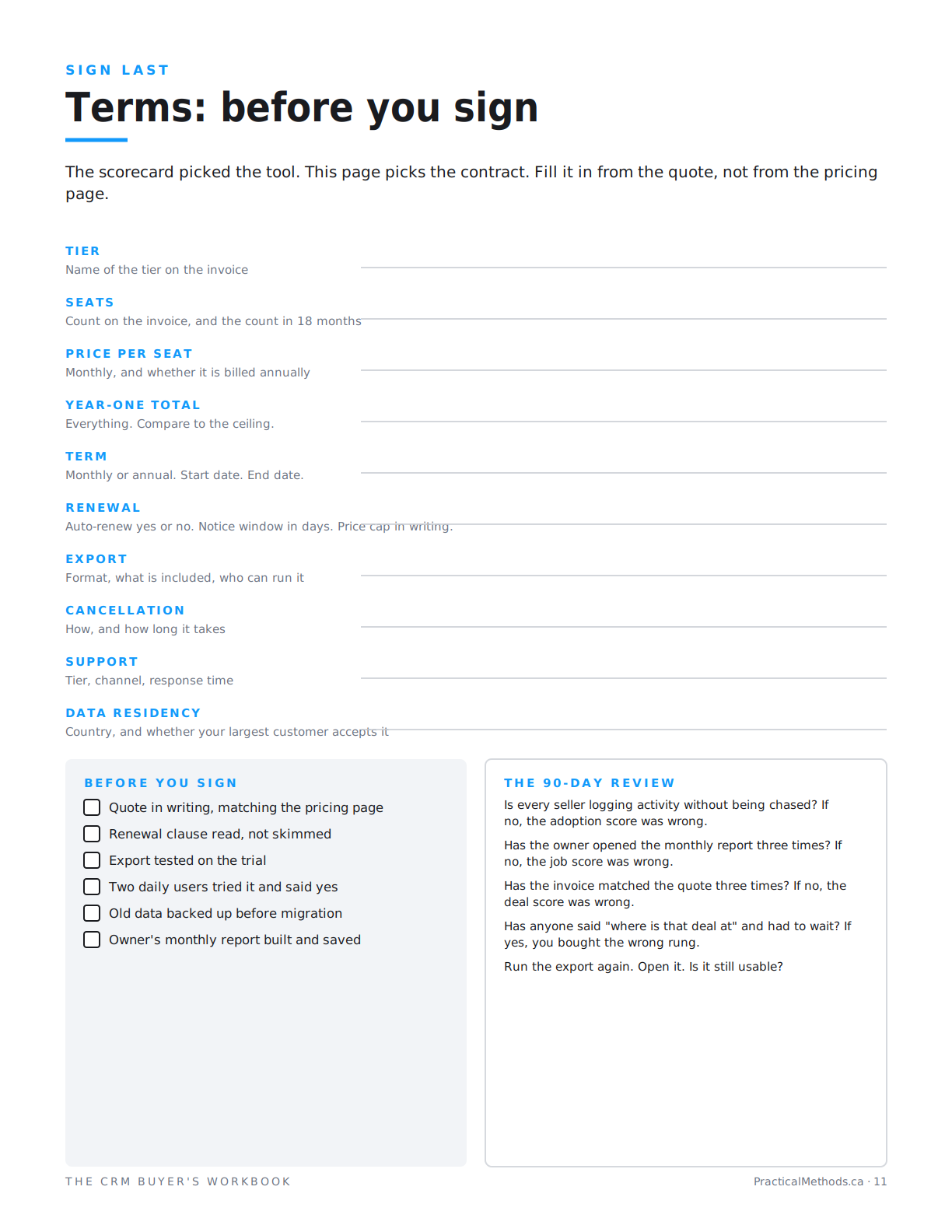
Same people who chose it, thirty minutes, five questions. Is every seller logging without being chased? If not, the adoption score was wrong. Has the owner opened the report three times? If not, the job score was wrong. Has the invoice matched the quote three times? If not, the deal score was wrong. Has anyone said "where is that deal at" and had to wait? If yes, you bought the wrong rung. Run the export again and open it. Is it still usable?
The review is the point of the timeline. A CRM is not set up when it is configured. It is set up when the ninety-day questions come back clean.
Book the review before the first seat is created. It is the meeting that gets skipped when the tool is working and the meeting that gets skipped when it is not, for opposite reasons. Same people, same room, thirty minutes, in the calendar on day one.
What not to do in the first week
Do not import the whole list. Do not build automations. Do not connect the accounting system, the marketing tool or the website form. Do not add a field because the vendor's template has it. Do not let the sales rep configure it on a call, because the configuration you cannot reproduce yourself is the configuration you cannot fix in month four. Every one of these is a good idea in month two if the ninety-day review says the team is logging. In week one they are the reasons setup takes a month.
When it takes longer than a week
Three things stretch it: dirty data, a tier where the report you need is one column up, and a tool that needs paid implementation for a team your size. The first is your problem and worth the time. The second and third are the tool's, and they are signs to walk away that should have been caught at the gates. The full method, gates included, is free on the site.
Read the free method
Criteria: Buying a CRM. Five articles: narrowing, the job, the adoption, the exit, the deal.
Read the free methodFrequently asked questions
How long does it take to set up a CRM for a small business?
About a week of one admin's time for a team under fifty: stages and fields, import, email sync, the owner's report, seller onboarding. Spread over two or three calendar weeks in practice.
What takes the longest in CRM setup?
The import, when the old data is dirty. A clean spreadsheet imports in an hour. Five years of inconsistent exports take days and a decision about what to leave behind.
Do I need a consultant to implement a CRM?
Not for a team under fifty on a tool built for small teams. If the vendor requires paid implementation at your size, that is a sign to walk away that belongs at the gates, not after purchase.
What should I configure first?
Deal stages that match how you sell, the two or three custom fields from your shape, and seats. Nothing else until the thirty-day mark.
How long should I wait before adding automations?
Thirty days. The first month is for learning what the team does with the plain tool, so the ninety-day review has something true to measure.
What is a CRM 90-day review?
Thirty minutes with the people who chose the tool, five questions: are sellers logging, is the owner opening the report, does the invoice match the quote, has anyone waited for a pipeline answer, is the export still usable.
How do I migrate from a spreadsheet to a CRM?
Clean the sheet first: duplicates, dead contacts, empty columns. Import only contacts active in the last ninety days plus open deals. Test the import on the trial before the real one.
When is a CRM actually set up?
Not when it is configured. When the ninety-day questions come back clean.
The list is not the decision. It is how you find the one or two things that are.
Not a review, not rankings, not CRM advice. A method.

