
Buying a CRM
HubSpot vs Pipedrive for a small business: six gates, not a feature list
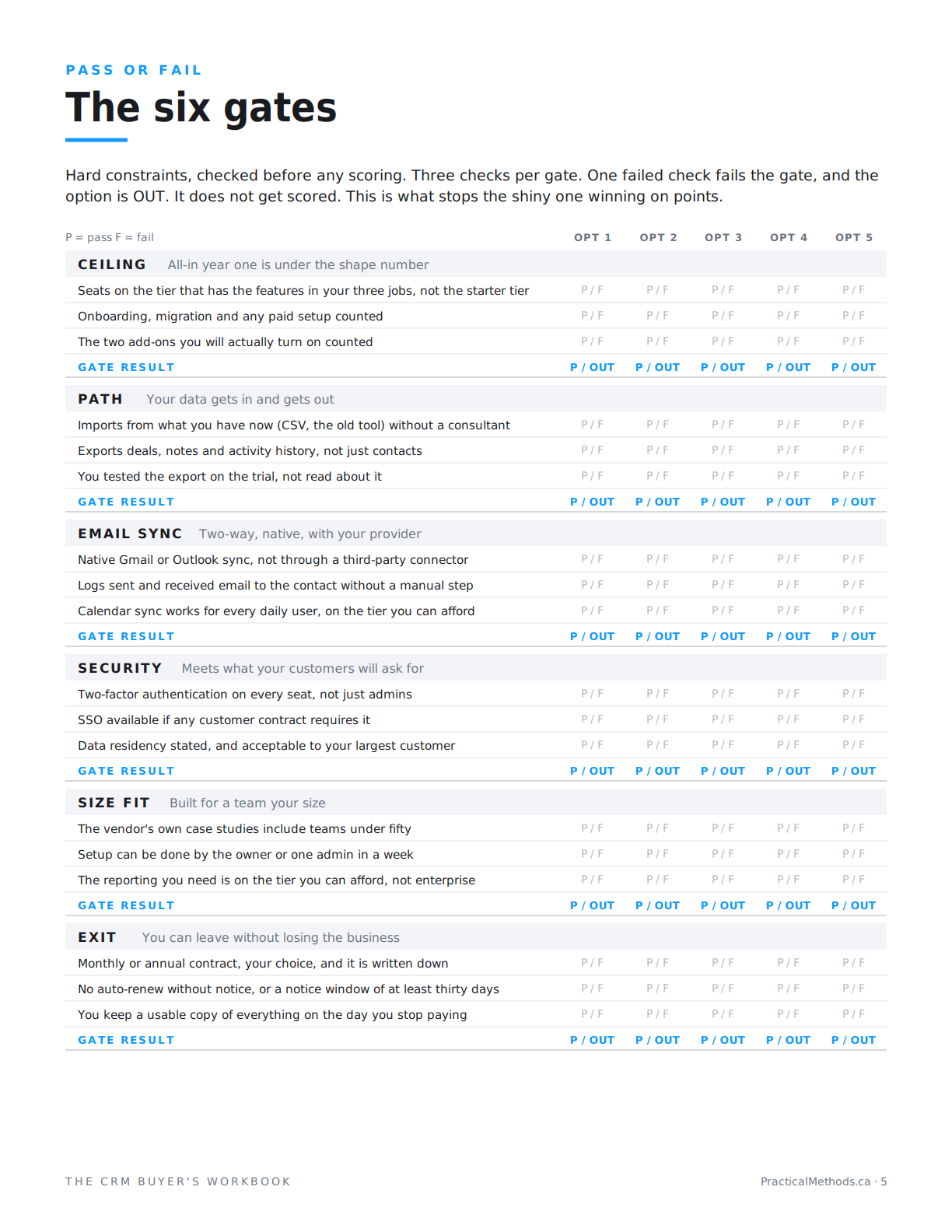
Quick answer: HubSpot and Pipedrive are on different rungs. HubSpot is a suite with a real free tier for two users and a steep jump to Professional. Pipedrive is a standalone sales CRM with no free plan, a $14 entry tier that lacks email sync, and Growth at $39 per seat where the tool starts. For a small team the decision is rarely features, which both have. It is three things: which one your reluctant seller logs into, what each export includes, and whether you will need the marketing and service hubs HubSpot is priced to sell you. Run both through six gates on your own trial before reading anyone's verdict, including this one.
Two different rungs
The comparison most people run is feature against feature, and it is a draw, because both tools have contacts, deals, pipelines, email, reports and a mobile app. The comparison that matters is which rung each sits on. Pipedrive is a standalone sales CRM: a pipeline, an activity log, reporting, and add-ons. HubSpot is a platform: the CRM is the free core, and Sales, Marketing, Service and Content hubs are priced on top of it. Buying HubSpot for the CRM alone is buying the ground floor of a building. That can be exactly right. It is a different purchase.
| HubSpot | Pipedrive | |
|---|---|---|
| Rung | Suite: free CRM core, paid hubs on top | Standalone sales CRM with add-ons |
| Free plan | Yes, 2 users, 1 pipeline, 1,000 contacts | No. 14-day trial |
| Entry tier with email sync | Sales Hub Starter, $15 to $20 per seat (annual) | Growth, $39 per seat (annual). Lite at $14 has no sync |
| Where automation and sequences start | Professional, $90 to $100 per seat, plus $1,500 onboarding | Growth, $39 per seat |
| Monthly billing | Entry tiers yes; Professional and Enterprise annual | All tiers, 25 to 50 percent above annual |
| Built to sell you | Marketing, Service and Content hubs | Add-ons: campaigns, documents, lead capture |
US list prices, annual billing, checked September 16, 2026 from secondary sources. Free-tier limits and tier contents change often. Verify on each vendor's pricing page and test the export on the trial.
Gate by gate
Ceiling. Both pass for a small team at the entry tier. HubSpot's Starter at $15 to $20 per seat is cheaper than Pipedrive's Growth at $39. But the tier trap is sharper on HubSpot: sequences, automation and custom reporting sit on Professional at roughly $90 to $100 per seat with a $1,500 onboarding fee. Pipedrive's Growth includes email sync, automation and sequences at $39. Price the tier that does your three jobs, not the entry tier, and the gap narrows or reverses.
Path. Both import from CSV and export contacts, companies and deals. What each export includes for notes, emails and activity history, and in what format, is the check to run yourself on the trial. Do not rate it from the help article.
Email sync. Both have native Gmail and Outlook two-way sync, but not on every tier: Pipedrive's Lite tier does not include it, and HubSpot's free tier limits it. Check the tier you are pricing, not the product.
Security. Two-factor authentication on both. Single sign-on sits on higher tiers on both. If a customer contract requires SSO, price that tier.
Size fit. Both are built for small teams and both publish small-business case studies. Setup by one admin in a week is realistic on either at the entry tier.
Exit. Both offer monthly billing at a premium at the entry tiers. HubSpot's Professional and Enterprise require annual commitment. Pipedrive's month-to-month runs 25 to 50 percent above annual. Read the renewal clause on whichever tier you are buying.
Where the two usually separate
The free tier. HubSpot's is real: two users, one pipeline, 1,000 contacts, email logging, as of September 2026. For a two-seller team that is year one at $0. Pipedrive has no free plan, only a fourteen-day trial. If the spreadsheet test says you are on the edge of needing a CRM, HubSpot's free tier is the next rung. Pipedrive is a decision to pay from day one.
The suite question. HubSpot's pricing is designed so that the CRM is cheap and the hubs are where the money is. If you will run email campaigns and a service desk in the next eighteen months, that is a feature. If you will not, it is a tier you are being walked toward. Pipedrive has add-ons, but they are add-ons to a sales tool, not a second product line.
The adoption test. This one cannot be read off a page. Pipedrive's interface is a pipeline first; HubSpot's is a platform with a pipeline in it. Sellers who live in the pipeline tend to prefer one; owners who want everything in one place tend to prefer the other. Give the trial to the seller who least wants a CRM, for three days, and count what they logged. That number is the decision more often than anything in this article.
What this comparison cannot tell you
It cannot tell you which one your team will use. It cannot tell you whether the export on the tier you buy includes the notes, because that is a file you open, not a fact you read. And it cannot tell you whether the owner's monthly report exists on the entry tier of either, because that depends on which report. Those three are the decision, and they take an afternoon and three days on the trial.
The three questions that decide it
Does a deal that has gone quiet show up without building a report, on the tier you are pricing? Does the export include notes and activity history, in a file you opened? And which tool did the reluctant seller log more activity in? Two of the three are answered on the trial in an afternoon. The third takes three days. All three are worth more than every feature comparison you will read this week.
How to run this yourself
Open trials on both. Load fifty real contacts and ten real deals into each. Run your three jobs with a stopwatch. Run the export and open it. Give both to the reluctant seller. Then price the tier each one actually needed, at the seat count you will have in eighteen months, and get both in writing. The full method, with the 46 questions and the scorecard, is free on the site.
Read the free method
Criteria: Buying a CRM. Five articles: narrowing, the job, the adoption, the exit, the deal.
Read the free methodFrequently asked questions
Is HubSpot or Pipedrive better for a small business?
Neither by default. HubSpot fits a team that will use the marketing or service hubs, or a two-seller team that can live on the free tier. Pipedrive fits a team that wants a pipeline-first sales tool and will pay from day one.
Does HubSpot have a free CRM?
Yes. As of September 2026, two users, one pipeline, 1,000 contacts, with Gmail and Outlook logging. Limits change; check the pricing page.
Does Pipedrive have a free plan?
No. Every tier has a fourteen-day free trial. The Lite tier at $14 per seat does not include email sync; Growth at $39 does.
Which is cheaper, HubSpot or Pipedrive?
At the entry tier, HubSpot Starter. At the tier with automation and sequences, Pipedrive Growth, because HubSpot moves those to Professional with a $1,500 onboarding fee.
Can I switch from HubSpot to Pipedrive later, or the other way?
Both export contacts, companies and deals to CSV. What survives of notes, emails and activity history depends on the tool and tier. Run the export on the trial and open the file before deciding.
Which one will my sales team actually use?
Give the trial to the seller who least wants a CRM for three days and count what they logged. That answer is specific to your team and beats any comparison.
Do I need HubSpot's marketing and service hubs?
Only if someone on the team will run campaigns or a support desk in the next eighteen months, by name. If not, you are paying for a suite you use as a CRM.
Is this a recommendation?
No. It is a method for comparing the two on your own trial: six gates, then the three questions that usually decide it. The full series is free on the site.
The list is not the decision. It is how you find the one or two things that are.
Not a review, not rankings, not CRM advice. A method.

