
Buying an AI Tool
How to choose an AI tool for your business without buying five
Quick answer: before you shop, prove you need a tool at all by running the job through the AI assistant you already pay for. Then write an eight-line shape (the one job, who does it, seats, ceiling, data, systems, what worked looks like, who signs), pick a rung on the ladder, and run every shortlisted tool through six pass-or-fail gates: ceiling, path, data, security, fit and exit. Only survivors get scored.
Start with the tool you already have
Most firms with five to fifty people already pay for an AI tool and have never pointed it at the job. Microsoft 365 and Google Workspace both ship an assistant. Some plans include it. Some sell it as an add-on. Either way, it is sitting inside the documents and the inbox where the job already happens, and it costs less than a new vendor.
So gate 0 is the bundled test. Three checks. Do you pay for a suite with an assistant in it? Has someone run the actual job through it, with real inputs, at least three times? Can you name, in one sentence, the thing it could not do? If the second check is a no, stop. Run the job through the bundled tool for two weeks. Come back with the sentence. That sentence is what you are shopping for. If you cannot write it, you are not shopping. You are browsing.
Write the shape before you look at a vendor page
The shape is one page, eight lines, written before you open a single pricing page. It fixes what you actually need so that you can say no to the rest. Half the market disappears on its own once the shape exists. That is the point of it.
- The one job. One sentence. A task someone does every week. Not "use AI."
- Who does it, weekly. Names, not roles.
- Seats in twelve months. People who will log in, not the headcount.
- Annual ceiling, all-in, in Canadian dollars. Seats, usage, setup, training. One number.
- Data it will touch. Client files, financials, or nothing sensitive.
- Systems it must sit inside. Email, documents, the CRM, the browser.
- What "worked" looks like at ninety days. Something you can measure.
- Who signs. One name. A committee is not a decision.
Line one is the whole exercise. If the one job takes more than a sentence to describe, you have two decisions. Run the method twice. Line four is the one people avoid saying out loud. Say it. A ceiling exists whether or not it is written down, and the version that is written down is the only one that can say no to a vendor.
Pick the rung before the product
AI tools do not compete in one market. They compete in four, and buyers lose time comparing a rung-one option against a rung-three option as if they were the same thing. Decide which kind of tool first.
- Rung one: the one you already have. Copilot in Microsoft 365, Gemini in Workspace. Pick it when the job lives in email, documents or meetings and the output is a draft a person finishes.
- Rung two: a general assistant seat. A standalone team plan. Pick it when the job is thinking, drafting or analysis across many file types and the people already know how to ask.
- Rung three: a point tool for one job. Meeting notes, proposal drafting, support replies, contract review. Pick it when the job is narrow, repeated, and the output has the same shape every time.
- Rung four: a custom build or agent. Only after rung three has been tried, the volume justifies it, and someone in-house will own it.
Most jobs stop at rung one or rung three. Rung four is a different meeting.
The six gates
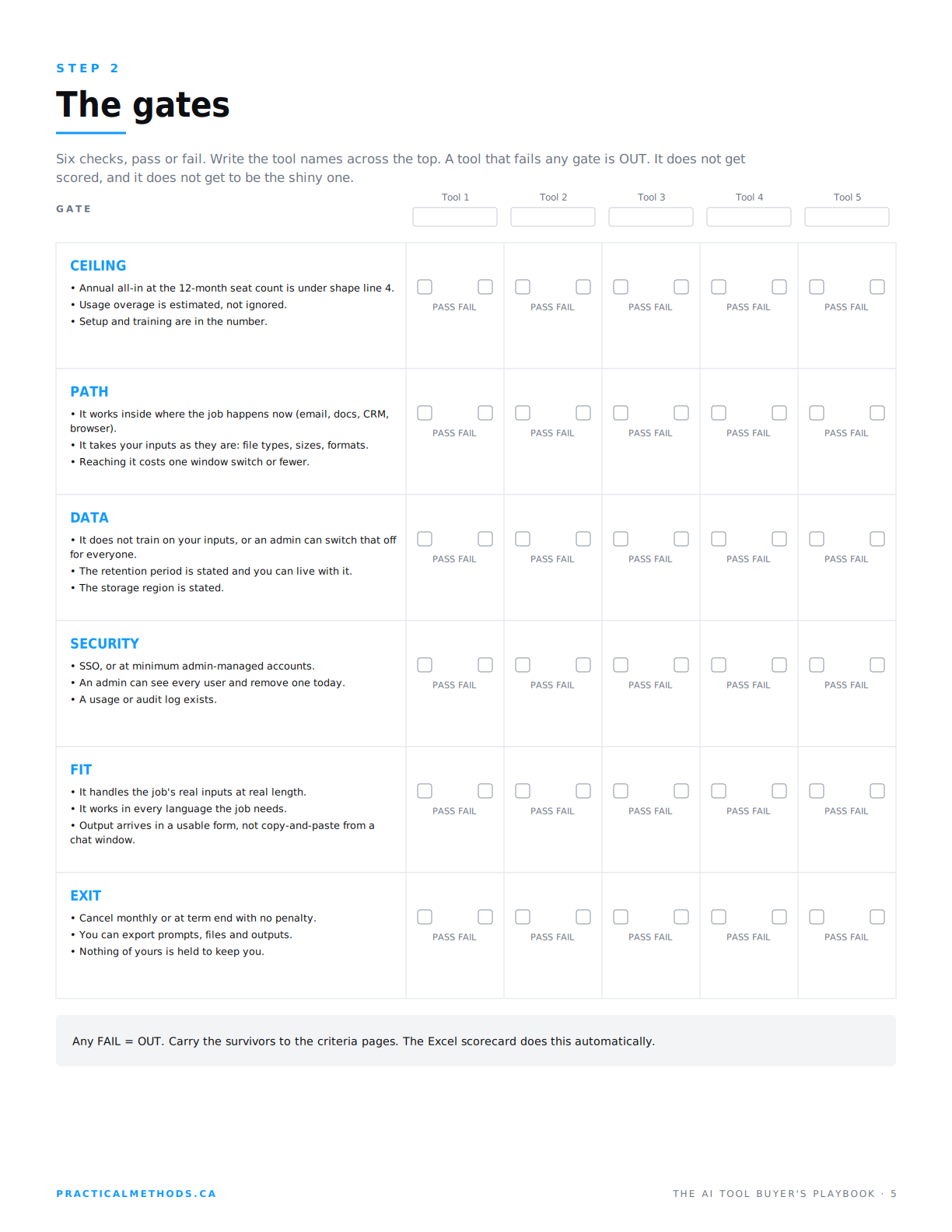
Gates are pass or fail. They are checked before anything is scored, and a tool that fails any one of them is out. It never reaches the scorecard. This is what stops the impressive one winning on points after failing something that should have ended the conversation.
The AI Tool Buyer's Playbook
Six gates. Four weighted criteria. Five tools. $49, one download.
Get the playbook · $49Ceiling
The annual all-in number at the twelve-month seat count is under line four of the shape. Usage overage is estimated, not ignored. Setup and training are in the number.
Path
It works inside where the job happens now. It takes your inputs as they are: your file types, your sizes, your formats. Reaching it costs one window switch or fewer.
Data
It does not train on your inputs, or an admin can turn that off for everyone. The retention period is stated and you can live with it. The storage region is stated.
Security
Single sign-on, or at minimum admin-managed accounts. An admin can see every user and remove one today. A usage or audit log exists.
Fit
It handles the job's real inputs at real length. It works in every language the job needs. The output arrives in a usable form, not copy-and-paste from a chat window.
Exit
Cancel monthly or at term end with no penalty. You can export prompts, files and outputs. Nothing of yours is held to keep you.
What survives, and what happens next
Run three to five tools through the gates with the vendor pages open. Data and security are where favourites usually die, because the answers are on a terms page nobody read. What passes goes to the four weighted criteria: the job at weight five, the adoption at four, the trust at four, the deal at three. The next four articles in this series take one criterion each.
If nothing survives, that is a result. If only the bundled tool survives, that is a better one. Write it down like a decision.
Signs to walk away
- The feature you need is one tier up, and that tier doubles the price.
- "Contact sales" on a product for a twelve-person team.
- The trial requires a credit card and cancels only by phone.
What to check yourself
- Build year one on a napkin: seats times tier times twelve, plus onboarding, plus add-ons.
- Ask for the quote in writing before the trial ends, while you still have leverage.
- Check whether the price shown is monthly billed annually. It usually is.
The series
- How to choose an AI tool for your business without buying five
- How to test an AI tool before buying: the job comes first
- Why employees don't use AI tools, and how to score for it before buying
- AI tool data privacy checklist for a small business: the trust criterion
- AI tool pricing, per seat vs usage: how to get to one annual number
Frequently asked questions
Do I need an AI tool at all?
Run gate 0 first. If you already pay for Microsoft 365 or Google Workspace with an assistant included, run the job through it three times with real inputs. If it does the job, you do not need a tool. If it does not, write down the one thing it could not do and shop for that.
How many tools should I shortlist?
Three to five. Fewer than three and you have not looked. More than five and nobody will run the trials properly. The gates will usually cut five to two or three.
What is the difference between a gate and a criterion?
A gate is pass or fail and is checked before scoring. A criterion is rated one to five and weighted. A tool that fails a gate is out and never gets a score, however good it is at everything else.
What if a tool fails one gate but is clearly the best?
Then it is out. That is the gate doing its job. A tool that trains on your client data by default and will not turn it off is not the best tool for a firm that handles client data, whatever the demo looked like.
Should the ceiling include usage-based costs?
Yes. Estimate usage at the twelve-month seat count and add it. A tool that is cheap per seat and expensive per use will pass the ceiling on the pricing page and fail it on the invoice.
Who should write the shape?
The person who will own the tool after purchase, with the people who will do the job weekly. Not the person most excited about AI. The shape is a list of constraints, and enthusiasm is bad at constraints.
Which rung is right for a small firm?
Usually rung one or rung three. Rung one if the job lives in documents and email. Rung three if the job is narrow and repeated with a fixed output. Rung two if the team already prompts well. Rung four almost never, and never first.
How long does narrowing take?
Gate 0 takes two weeks of real use. The shape takes an hour. The gates take an afternoon with the vendor pages open. The trials that feed the criteria take another two weeks. Six weeks from start to a decision that holds.
The list is not the decision. It is how you find the one or two things that are.

