
Buying a CRM
The job: a CRM requirements checklist that ignores the feature page
Quick answer: The job is the weight-5 criterion. It asks whether the CRM does the three jobs you wrote in your shape, in the way you actually work, in under three clicks, with your real data on the trial. Fourteen questions, each rated 1 to 5. A tool that scores badly here should not be on the list no matter what the rest of the scorecard says.
5 out of five.
Why the job carries the most weight
The three jobs from your shape are the reason you are buying anything. If the tool does them cleanly, every other criterion is about living with it. If it does not, nothing else matters and the weight should make that impossible to hide. So the job is weighted 5, the highest on the card, and the questions are designed to be tested, not asked.
The test is always the same. Load fifty of your real contacts and ten real deals into the trial. Run the three jobs. Time each one. Count the clicks. Sample data hides the friction that shows up with your data, because sample data was built to demo well.
The fourteen questions
The first three are your own. Job one, job two and job three from the shape, each done in under three clicks from the home screen. If you did not write jobs in the shape, go back and write them. "Pipeline management" cannot be timed. "Show me every deal that has gone quiet for ten days" can.
The next four are about the pipeline. Every open deal, by stage, on one screen. A deal that has gone quiet visible without building a report. Next action and due date living on the deal, not in a separate task app. The owner's monthly report existing as a default view or taking under ten minutes to build, and built by you, not the sales rep on the call.
The next four are about records. Contacts, companies and deals linked, so one record shows the whole history. Any contact found in under five seconds from anywhere in the tool. Custom fields for your two or three must-have data points, on your tier. Deal stages renamed and reordered to match how you actually sell, because every tool ships with someone else's stages.
The last three are about people. Handoff from one seller to another keeps the full history. The tool works on the trial with your real data, not the vendor's. And a seller who has never seen it can find their own deals in the first five minutes, which you test by handing it to one.
The CRM Buyer's Playbook
The workbook, the Excel scorecard, the session deck and the facilitator's guide. Run it with your team in ninety minutes.
Get the Playbook · $49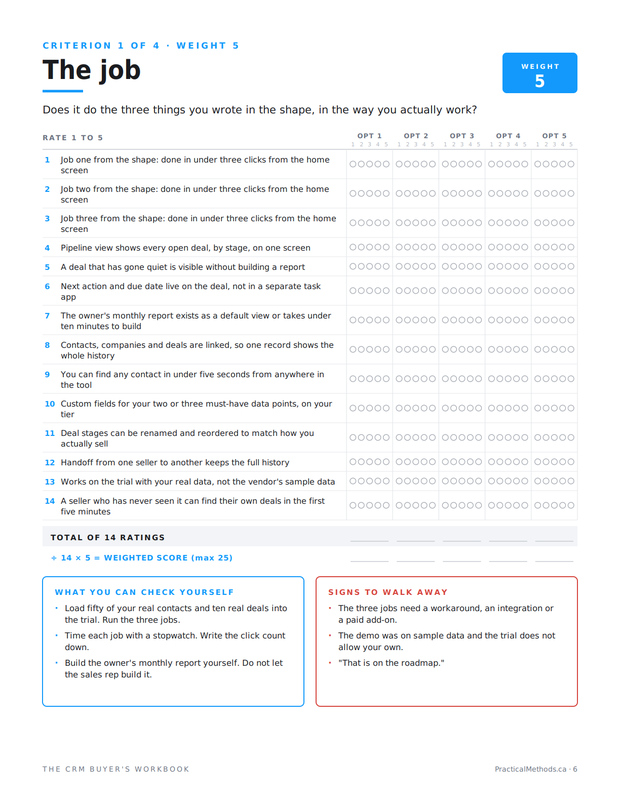
How to rate honestly
One is no, or badly. Three is yes, with friction. Five is yes, cleanly, and you tested it. The word tested matters. A five you did not test is a three. Most first-pass ratings from a demo are inflated by a point; the trial with real data brings them down. That is not a problem with the method. That is the method working.
Average the fourteen ratings and multiply by five. The maximum is 25. A tool below 15 here is a tool that does not do the job you are buying it for, and no adoption or pricing score should rescue it.
The three questions that decide most shortlists
In practice three questions separate the survivors. The quiet deal question, because most tools make you build a report to see what has stalled, and nobody builds the report. The next action question, because a CRM that sends you to a separate task app for follow-up loses the follow-up. And the monthly report question, because if the owner cannot build the one view they need in ten minutes, they will ask the seller to export a spreadsheet, and the CRM has failed at the only job the owner cared about.
What the score cannot tell you
The job score is a measurement of fit on the day you tested it. It says nothing about whether the tool will still fit when seats double, whether the sellers will keep logging, or what leaving costs. Those are the next three criteria. A high job score earns a tool a place on the shortlist. It does not earn the purchase.
Three mistakes that inflate the job score
The first is rating the demo. A demo is a performance on data chosen to perform. The three jobs look effortless because the sales rep has run them a thousand times and the deals are already staged. Rate the trial, on your data, with your hands on the mouse.
The second is letting the enthusiast rate. Every team has someone who wanted a CRM for years and will forgive anything that looks like one. Their fives are threes. Have the person who will run the monthly report do the rating, because that person has a job to test rather than a hope to confirm.
The third is scoring the roadmap. "That is coming next quarter" is a one. You are buying what exists on the day you test it. If the feature arrives, you can raise the score at the 90-day review. Until then it is a promise, and promises do not do jobs.
How to run this in the room
If you are scoring with a team, read each question aloud and ask for one number per option. A one-point disagreement moves on. A three-point disagreement stops the room, and you ask each person what they saw. That gap, between someone who rated the quiet-deal question a 2 and someone who rated it a 5, is usually the difference between a person who tested it on the trial and a person who watched the demo. Resolve it by testing, not by averaging.
Type the numbers into the Excel scorecard as you go. The average and the weighted score calculate on the tab, and the weight cell at the top is editable. If the room decides the job should be weighted 6 out of the available points, change it there and say why. The reason goes in the notes.
Signs to walk away
- The three jobs need a workaround, an integration or a paid add-on.
- The demo was on sample data and the trial does not allow your own.
- "That is on the roadmap."
What to check yourself
- Load fifty real contacts and ten real deals into the trial. Run the three jobs.
- Time each job with a stopwatch. Write the click count down.
- Build the owner's monthly report yourself. Do not let the sales rep build it.
Next article
The series
- How to choose a CRM for a small business: narrow first
- The job: a CRM requirements checklist that ignores the feature page
- The adoption: why sales teams stop using the CRM
- The exit: what it costs to leave a CRM, checked before you sign
- The deal: the hidden costs in CRM pricing, and what to get in writing
Frequently asked questions
Why is the job weighted 5 and not everything else?
Because it is the reason you are buying. If the tool does not do the three jobs, the rest of the scorecard is about living with a tool that does not work. The weight makes that impossible to average away.
What counts as a job rather than a feature?
A job can be timed and counted. "Show me every deal that has gone quiet for ten days" is a job. "Pipeline management" is a feature every vendor claims.
Do I have to use real data on the trial?
Yes. Sample data was built to demo well. Fifty real contacts and ten real deals show the friction that sample data hides.
What if a tool does two jobs well and one badly?
Rate each job separately. The average will show it. Then ask whether the bad job was the one that made you start looking. If so, that tool is out regardless of the average.
How is the weighted score calculated?
Average the fourteen ratings, then multiply by the weight of five. Maximum 25. In the Excel scorecard this is a formula and the weight is editable.
Should the sales rep build the monthly report during the demo?
No. Build it yourself on the trial. If it takes you more than ten minutes, the owner will never open it.
What if the three jobs need an add-on?
That is a sign to walk away, or at minimum to add the add-on cost to the ceiling gate and check whether the tool still passes.
Can a high job score be wrong?
It can be inflated. Most demo-based ratings drop a point on the trial with real data. Rate on the trial, not the demo.
The list is not the decision. It is how you find the one or two things that are.

