
Buying a CRM
How to choose a CRM for a small business: narrow first
Quick answer: Do not start with a list of CRMs. Start with one page that fixes what you need (the shape), a three-question test for whether you need a CRM at all, and a choice of category before product. Then run every candidate through six pass-or-fail gates: ceiling, path, email sync, security, size fit and exit. Anything that fails a gate is out and never gets scored. That gets a small business from hundreds of options to five in an afternoon, without a demo.
Why the list is the problem
Search for a small business CRM and you get a list. Ten tools, twenty tools, forty. Every one of them does contacts, deals, pipeline, email, reports and a mobile app. The feature pages are interchangeable because the features are. What differs is how each tool behaves in month four, when the person who championed it is busy and the sellers have quietly gone back to their inboxes.
You cannot see month four on a feature page. You can only see it by asking questions the feature page does not answer, and by asking them in an order that stops the shiniest demo from winning. That order is the method. Narrow first. Score second. Decide last. This article is the narrowing.
Step one: write the shape
The shape is one page, written before you open a single pricing tab. It fixes what you need so you can say no to tools that are not for you. Eight lines.
The three jobs. The three things this CRM must do on a normal Tuesday. Not features. Jobs. "Show me every deal that has gone quiet for ten days" is a job. "Pipeline management" is a feature that every tool claims.
Daily users, by name. Seats in eighteen months, not today, because pricing tiers punish growth. The annual ceiling, all in: seats, onboarding, migration and the add-ons you will actually buy, as one number. Which email and calendar the team uses. Where contacts live now, how many, and how clean. The one report the owner needs monthly. And who signs. One name. If the answer is a committee, fix that before anything else.
A shape written with a product already in mind is that product's spec sheet. Write it first, or a demo will write it for you.
Step two: the spreadsheet test
Most first CRMs are bought to fix a problem a spreadsheet would fix. Three questions. Does only one person sell? Are there fewer than 300 active contacts, where active means touched in the last ninety days? Has nobody ever asked "where is that deal at" and had to wait for an answer?
Three yeses and you do not need a CRM this year. A spreadsheet with a Next Action column runs it. This is not a trick question. Plenty of businesses pay for a CRM to hold a list that a spreadsheet already held, and the CRM makes the list harder to read.
Fewer than three yeses, keep going.
Step three: pick the rung
The real choice comes before the product. There are four rungs. A spreadsheet: one sheet, one owner, a Next Action column, free, breaks at the second seller. An email-native add-on: a CRM that lives inside Gmail or Outlook, cheap, good if the job is follow-up and nothing else. A standalone CRM: pipeline, contacts, activity log, reports, which is where most teams under fifty belong. A sales suite: CRM plus marketing automation plus a service desk, which you buy when you need the other two, not before.
Pick the rung, then compare tools on that rung only. A suite will always beat a spreadsheet on features. That was never the question. The most common expensive mistake in this market is a twelve-person team on rung four because the demo showed email campaigns nobody on the team will ever send.
The six gates
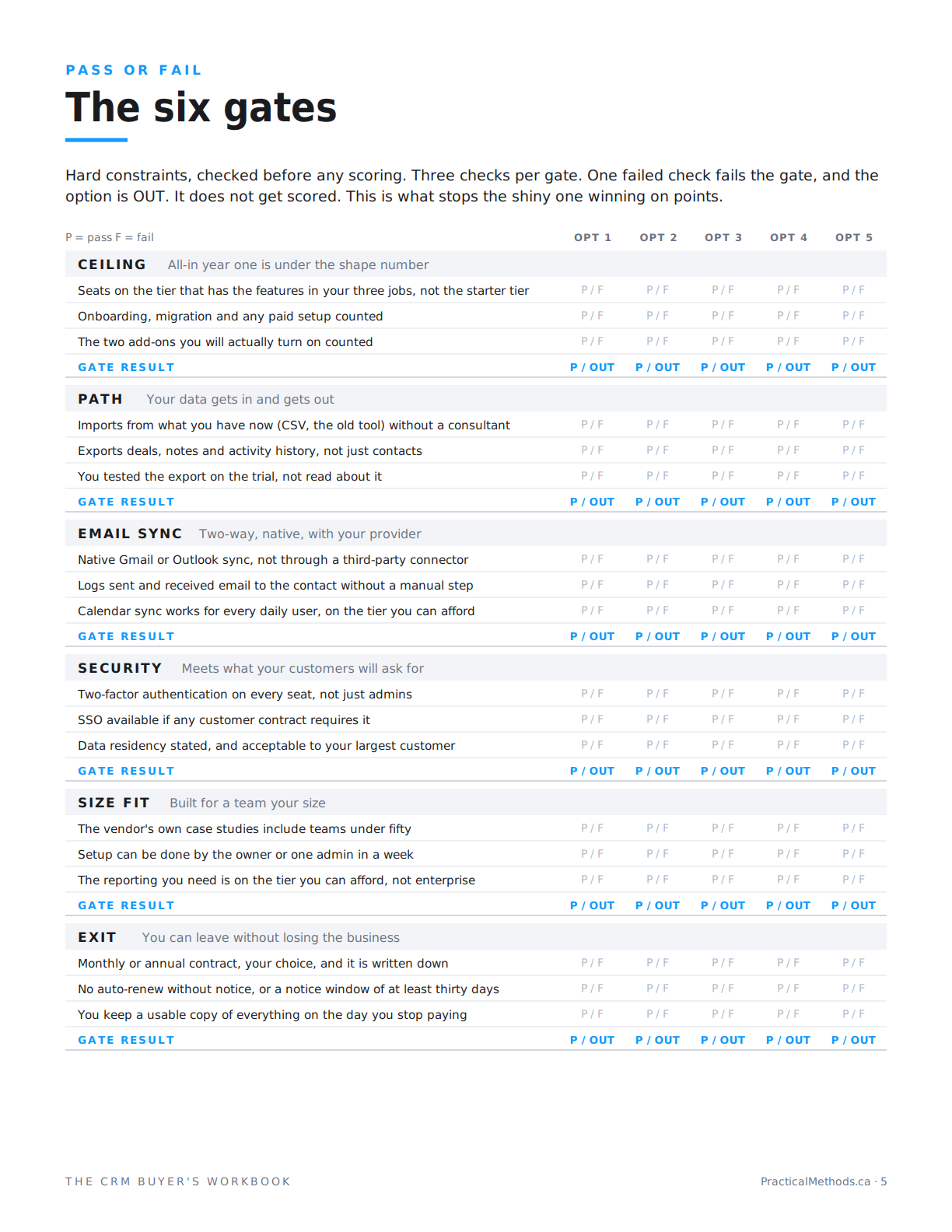
Gates are hard constraints, checked before any scoring. Three checks per gate. If any check fails for a candidate, the gate fails, and the candidate is out. It does not get scored. This is what stops a shiny option from winning on points.
The CRM Buyer's Playbook
The workbook, the Excel scorecard, the session deck and the facilitator's guide. Run it with your team in ninety minutes.
Get the Playbook · $49Gate one: ceiling
All-in year one is under the shape number. Count the seats on the tier that actually has the features in your three jobs, not the starter tier. Count onboarding, migration and any paid setup. Count the two add-ons you will actually turn on.
Gate two: path
Your data gets in and gets out. It imports from what you have now without a consultant. It exports deals, notes and activity history, not just contacts. And you tested the export on the trial rather than reading about it.
Gate three: email sync
Two-way and native with your provider. Not through a third-party connector. Sent and received email logs to the contact without a manual step. Calendar sync works for every daily user on the tier you can afford.
Gate four: security
Meets what your customers will ask for. Two-factor authentication on every seat, not just admins. Single sign-on available if any customer contract requires it. Data residency stated, and acceptable to your largest customer.
Gate five: size fit
Built for a team your size. The vendor's own case studies include teams under fifty. Setup can be done by the owner or one admin in a week. The reporting you need is on the tier you can afford, not on the enterprise tier.
Gate six: exit
You can leave without losing the business. Monthly or annual contract, your choice, written down. No auto-renew without notice, or a notice window of at least thirty days. You keep a usable copy of everything on the day you stop paying.
What you have now
A shape. A rung. And a list of at most five CRMs that passed six gates. That is the shortlist worth scoring. The next four articles score it, one criterion at a time: the job, the adoption, the exit and the deal. The weights are 5, 4, 4 and 3, and they are yours to change.
One warning about gates. Unknown is not a pass. If nobody can say whether the export includes notes, the answer is unknown, and unknown cannot win. Assign it to a person with a date, then keep going.
Signs to walk away
- The three jobs need a workaround, an integration or a paid add-on.
- The trial does not allow your own data.
- "Contact sales" for the price on a product aimed at a team of twelve.
- The export is contacts only, or arrives as a PDF.
What to check yourself
- Write the shape before you open a pricing page. Ten minutes.
- Run the export on the trial and open the file. Look for the notes column.
- Read the renewal clause. Search the terms for "increase" and "notice."
The series
- How to choose a CRM for a small business: narrow first
- The job: a CRM requirements checklist that ignores the feature page
- The adoption: why sales teams stop using the CRM
- The exit: what it costs to leave a CRM, checked before you sign
- The deal: the hidden costs in CRM pricing, and what to get in writing
Frequently asked questions
How many CRMs should a small business shortlist?
Five at most. The gates get you there. If more than five pass, your shape is too loose, usually the ceiling or the three jobs.
Do I need a CRM if I am the only salesperson?
Probably not this year. If one person sells, there are under 300 active contacts and nobody has waited for a pipeline answer, a spreadsheet with a Next Action column does the job.
What is the difference between a CRM and a sales suite?
A standalone CRM handles contacts, deals, pipeline and activity. A suite adds marketing automation and a service desk. Buy the suite when you need the other two, not before.
What does all-in year one include?
Seats on the tier with the features you need, onboarding or migration fees, and the add-ons you will actually turn on. One number, compared to the ceiling in your shape.
Why is email sync a gate and not a criterion?
Because without native two-way sync, activity does not get logged, and a CRM nobody logs into is a spreadsheet with a monthly fee. It is a hard constraint, so it is a gate.
What if a gate is unknown for every option?
Do not guess. Mark it unknown, assign someone to check the pricing page or the trial, and keep going. Unknown is not out, but unknown cannot win.
Can I skip the shape if I already know what I want?
You can, and the demo will thank you. The shape exists so that what you want is written down before a salesperson describes it for you.
How long does narrowing take?
An afternoon. The shape is ten minutes. The gates take longer only if you have to open trials to test the export, and you should.
The list is not the decision. It is how you find the one or two things that are.

