
Choosing Payroll Software
The filings: what payroll software files for you, and who pays when it is late
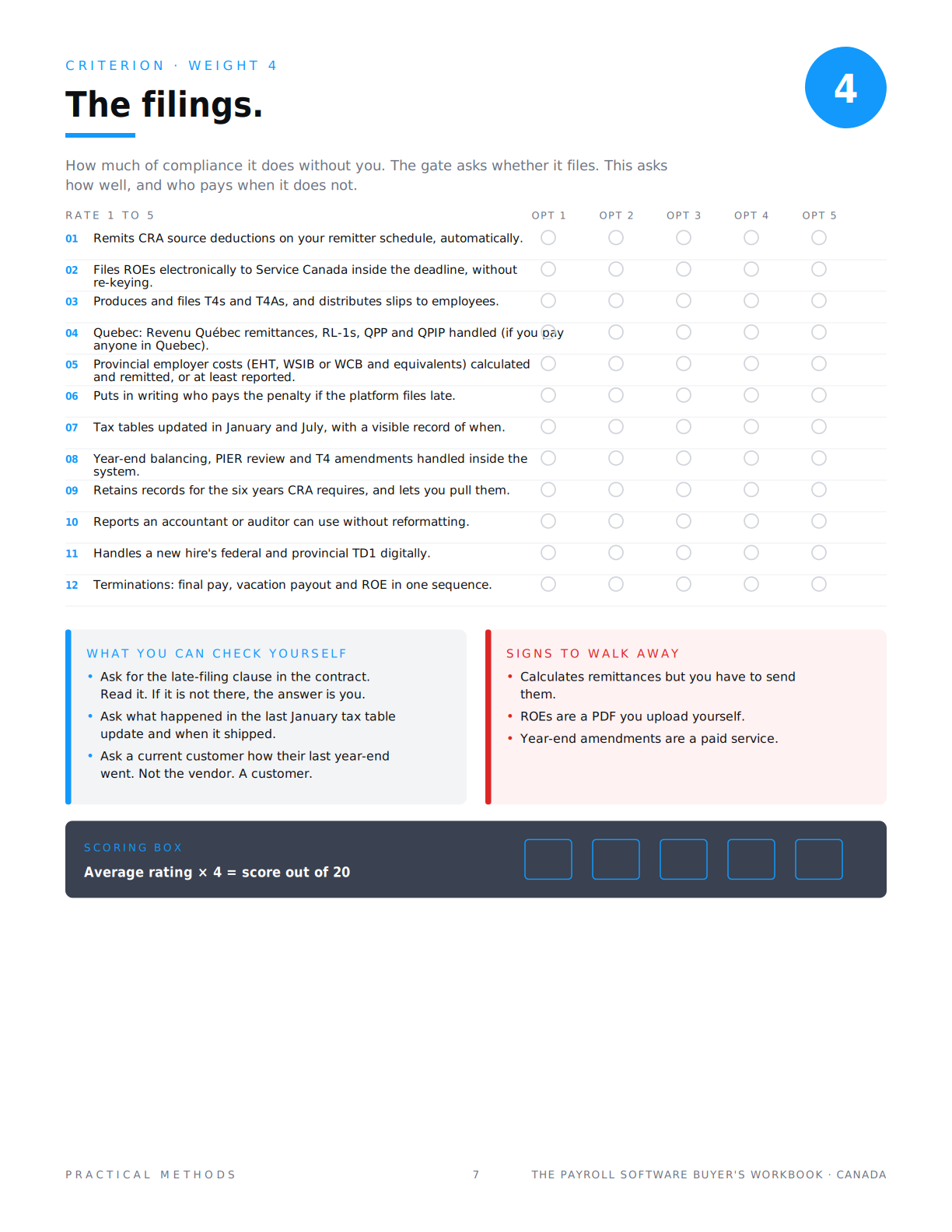
Quick answer: some payroll software files for you and some only calculates, and the difference is the whole point. The filings criterion, weight 4 of 5, scores twelve questions: whether the platform remits or deposits automatically on your schedule, files ROEs and T4s or 941s, 940s and W-2s, handles Quebec or state and local taxes, updates tax tables on time, handles year-end corrections inside the system, and puts in writing who pays the penalty when a filing is late.
Four out of five.
The gate asked if it files. This asks how well.
The filings gate in the first article was pass or fail: does the platform send the remittances, returns and slips, or does it hand you a number. Anything scored here already passed that gate. This criterion asks the harder questions: on what schedule, in which regions, with what record, and with whose money when it goes wrong.
It is weighted 4 because a filing failure is the most expensive thing payroll software can do to a small business, but it is not weighted 5 because the gate already removed the platforms that do not file at all. Rate twelve questions 1 to 5, average, multiply by four. Maximum 20.
The twelve questions, Canada and USA
The method is identical in both countries. The compliance layer is not. The workbook ships a Canada edition and a USA edition with the twelve questions written for each. Here they are side by side.
Automatic remittance. Canada: remits CRA source deductions on your remitter schedule. USA: deposits federal withholding, Social Security and Medicare on your deposit schedule, monthly or semi-weekly.
Returns. Canada: this is covered by the remittance itself. USA: files Form 941 quarterly and Form 940 annually, and shows you the confirmation.
Employment separations. Canada: files ROEs electronically to Service Canada inside the deadline, without re-keying. USA: new-hire reporting to the state within the deadline, and terminations with final pay by your state's deadline.
Year-end slips. Canada: produces and files T4s and T4As and distributes them to employees. USA: produces and files W-2s, W-3 and 1099-NEC and distributes copies to workers.
Second-tier jurisdictions. Canada: Quebec, if you pay anyone there, meaning Revenu Québec remittances, RL-1s, QPP and QPIP. USA: state withholding and unemployment in every state you pay in, plus local taxes where they apply.
Employer-side costs. Canada: EHT, WSIB or WCB and provincial equivalents calculated and remitted, or at least reported. USA: workers' comp reporting or pay-as-you-go premiums from the pay data.
Tax tables. Both: updated on time, in January and July in Canada, on state rate changes in the USA, with a visible record of when.
Year-end corrections. Canada: PIER review, T4 balancing and amendments inside the system. USA: year-end balancing and W-2c corrections inside the system.
Records. Canada: retained for the six years the CRA requires. USA: the four years the IRS requires. Both: and you can pull them yourself.
New hires. Canada: federal and provincial TD1 digitally. USA: W-4, state withholding form and I-9.
Reports. Both: something an accountant or auditor can use without reformatting.
The penalty clause. Both: puts in writing who pays if the platform files late.
The penalty clause
This is the question that separates a 5 from a 3 on this criterion, and it is almost never in the sales deck. When a remittance or deposit is late because of the platform, someone pays the penalty and interest. Vendors that file well put the answer in the contract, sometimes as a tax penalty guarantee. Vendors that do not put it in the sales email, or in a sentence that begins 'we have never had a problem'.
Ask for the clause. Read what it excludes. A guarantee that excludes any case where you entered data late, or where a bank rejected a debit, is narrower than it sounds. If it is not in the contract, the answer is you.
SIGNS TO WALK AWAY
- Calculates remittances or deposits but you have to send them.
- State registrations or Quebec are your problem.
- Year-end amendments are a paid service.
WHAT TO CHECK YOURSELF
- Ask for the late-filing or tax penalty clause in the contract. Read what it excludes.
- Ask what happened in the last January tax table update and when it shipped.
- Ask a current customer how their last year-end went. Not the vendor. A customer.
How to check it yourself
Ask when the last January tax-table update shipped, or the last state unemployment rate change was applied, and how customers were told. A vendor that cannot answer for last year will not answer for this year.
Ask a current customer how their last year-end went. Not a reference the vendor picks. A customer you find. Two questions: were the slips right, and how many corrections.
Read the help centre article on amending a T4 or issuing a W-2c. If it begins with 'contact support', the correction is a service, and services have a price and a queue in February.
A 5 and a 2
A 5: automatic remittance or deposit on your schedule, all returns and slips filed with a confirmation you can see, every region you pay in covered, a penalty clause in the contract, and year-end amendments you can do yourself.
A 2: the platform calculates and files federal only, state or Quebec is 'on the roadmap', and the late-filing answer is a reassurance.
Next: the people. What the staff see every two weeks, and what the owner sees on the first of the month.
The series
- Part 1: How to choose payroll software before you sit through a single demo
- Part 2: The pay run: the sixteen questions that decide whether payroll software belongs on your list
- Part 3: The filings: what payroll software files for you, and who pays when it is late (this article)
- Part 4: The people: what your staff see every two weeks, and what the owner sees on the first
- Part 5: The deal: what payroll software actually costs at your size, next year, and on the way out
Frequently asked questions
Does payroll software file taxes automatically?
Some does and some only calculates. Filing means the platform sends the remittance or deposit and the returns on the schedule without you touching them. The filings gate requires it; the filings criterion scores how completely it does it across every region you pay in.
Who pays the penalty if payroll software files late?
Whoever the contract says. Good platforms put a late-filing clause or tax penalty guarantee in writing, with exclusions. If there is no clause, the employer pays. Ask for it before signing; it is question six of twelve.
Does payroll software handle Quebec payroll?
Not all of it. Quebec has its own remittances to Revenu Québec, RL-1 slips, QPP and QPIP. If you pay anyone in Quebec, it is a gate check and a scored question. Ask specifically; 'all provinces' sometimes means 'all provinces except Quebec'.
Does payroll software file state and local taxes in the USA?
The better platforms handle state withholding and state unemployment in every state you register in, and local taxes where they exist. Some require you to register in each new state yourself; some do it for you. Local tax coverage varies most. Ask by state.
Does payroll software file ROEs?
Platforms built for Canada file records of employment electronically to Service Canada. Add-ons and US-first platforms sometimes generate a PDF for you to upload. The gate requires electronic filing; the criterion scores whether it happens inside the deadline without re-keying.
Does payroll software produce T4s and W-2s?
Nearly all produce them. Fewer file them and distribute them to employees without the office doing anything, and fewer still handle amendments (T4 amendments or W-2c) inside the system rather than as a paid service in February. Score all three parts.
How often are payroll tax tables updated?
In Canada the CRA publishes tables in January and July. In the USA federal tables change annually and state unemployment rates change on their own schedules. Question seven asks whether the platform updates on time and shows you a record of when it did.
How long does payroll software keep records?
The CRA requires six years; the IRS requires four. The question is whether the platform retains them that long and lets you pull them yourself after you leave. That overlaps with the exit gate.
The list is not the decision. It is how you find the one or two things that are.

