
Choosing Payroll Software
The people: what your staff see every two weeks, and what the owner sees on the first
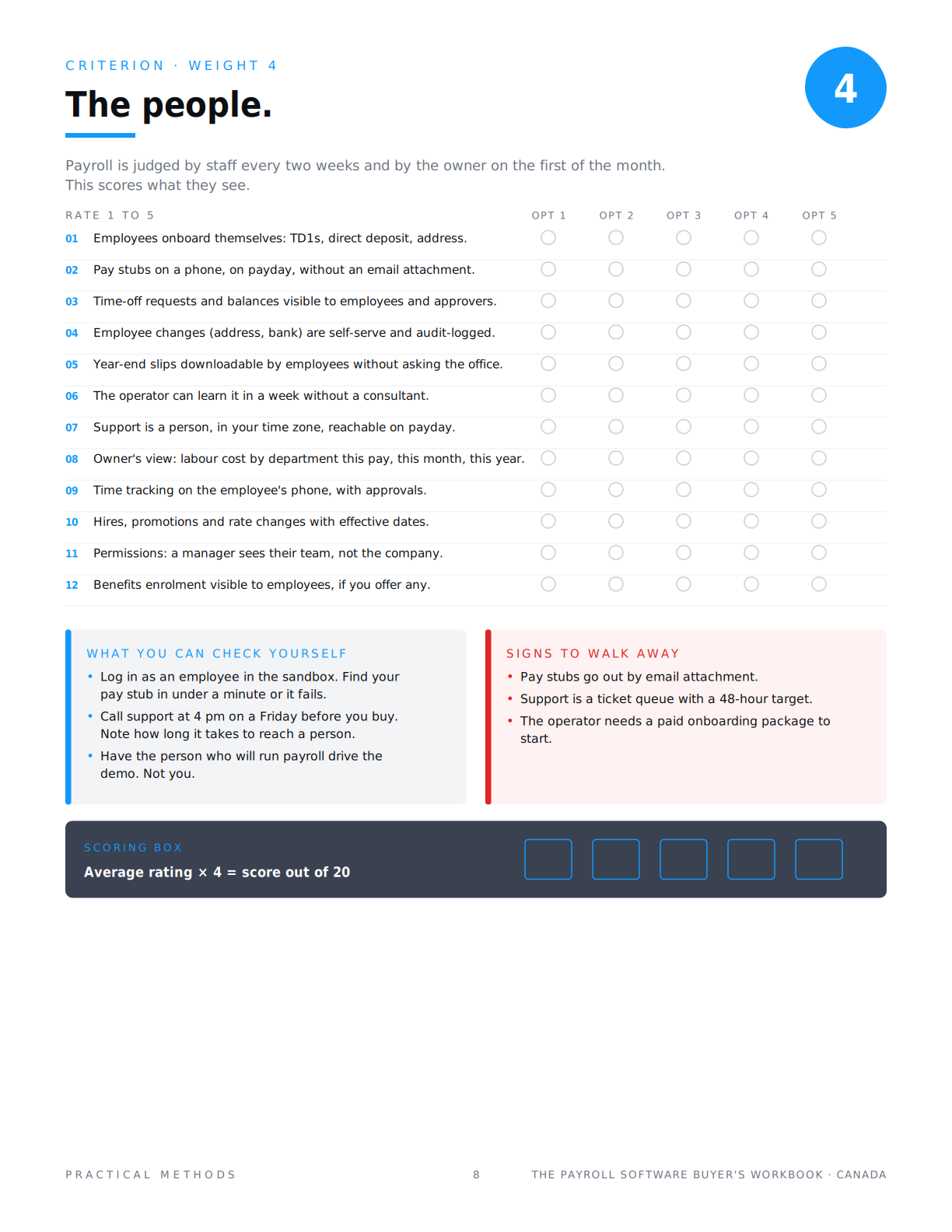
Quick answer: payroll software is judged by staff every payday and by the owner on the first of the month, so the people criterion, weight 4 of 5, scores what they see. Twelve questions: self-serve onboarding, pay stubs on a phone without an email attachment, time-off balances, self-serve changes with an audit log, year-end slips employees can download themselves, an operator who can learn it in a week, a support person reachable on payday, labour cost by department, mobile time tracking, effective-dated changes, manager permissions, and benefits visibility.
Four out of five.
Why the people criterion is weighted 4
The pay run is scored by the operator and the filings by the accountant. The people criterion is scored by everyone else. Staff open the app on payday. A manager approves hours on a phone. The owner opens one report on the first of the month and wants labour cost by department without exporting anything.
It is weighted 4 because a platform that runs correctly and files correctly but that staff hate will generate a support ticket every payday, and the operator will end up doing the self-service for them. Rate twelve questions 1 to 5, average, multiply by four. Maximum 20.
The staff side
Employees onboard themselves: TD1s, or W-4, state form and I-9, plus direct deposit and address, without the office typing anything. Pay stubs on a phone, on payday, without an email attachment. Time-off requests and balances visible to the employee and the approver. Employee changes to address or bank details are self-serve and audit-logged. Year-end slips downloadable by employees without asking the office. Time tracking on the employee's phone, with approvals. Benefits enrolment and elections visible, if you offer benefits.
The test for the whole group is one minute long. Log in as an employee in the sandbox and find your pay stub. If it takes longer than a minute, or requires an email, score the group down.
The onboarding test
Onboarding is where self-service either exists or does not. Picture the next hire. On day one they get a link. They enter their address, their bank details, and their tax forms: federal and provincial TD1s in Canada, or a W-4, the state withholding form and the I-9 in the USA. The office sees a completed record and approves it. Nobody types anything twice.
Now picture the version where the office emails a PDF, the hire prints it, signs it, photographs it, and someone re-keys the numbers into the platform on the Thursday before the first pay run. Both versions are called onboarding on the pricing page. Only one is self-service. Ask the vendor to show the new-hire link from the hire's side, on a phone, and time it.
SIGNS TO WALK AWAY
- Pay stubs go out by email attachment.
- Support is a ticket queue with a 48-hour target.
- The operator needs a paid onboarding package to start.
WHAT TO CHECK YOURSELF
- Log in as an employee in the sandbox. Find your pay stub in under a minute or it fails.
- Call support at 4 pm on a Friday before you buy. Note how long it takes to reach a person.
- Have the person who will run payroll drive the demo. Not you.
The operator side
The operator can learn it in a week without a paid consultant or onboarding package. Support is a person, in your time zone, reachable on payday. Hires, promotions and rate changes entered with effective dates, so a mid-period raise does not require arithmetic. Permissions: a manager sees their team, not the company.
Have the person who will run payroll drive the demo. Not the owner. The owner's questions are about reports; the operator's questions are about Tuesday.
The support question
Support is scored as one of twelve questions, but it is worth its own paragraph. Payroll problems happen on payday, in the afternoon, and they cannot wait until the next business day because people do not get paid. A ticket queue with a 48-hour target is fine for a CRM. It is not fine for payroll.
Before you buy, call support at 4 pm on a Friday. Note how long it takes to reach a person, whether that person is in your time zone, and whether they can see your account or have to escalate. That call is worth more than any reference.
The owner side
One report: labour cost by department, this pay, this month, this year, without exporting to a spreadsheet. That is question eight. If the answer is 'you can build a custom report', score it 3. If the report is on the home screen, score it 5.
A 5 and a 2
A 5: staff onboard themselves, find their stub on a phone in under a minute, request time off and see the balance, and the operator learned it in a week with a real person on the phone when the debit bounced.
A 2: stubs go out as PDF attachments, onboarding is a form the office types in, and support is a ticket with a two-day target.
Last: the deal. What it actually costs at your size, next year, and on the way out.
The series
- Part 1: How to choose payroll software before you sit through a single demo
- Part 2: The pay run: the sixteen questions that decide whether payroll software belongs on your list
- Part 3: The filings: what payroll software files for you, and who pays when it is late
- Part 4: The people: what your staff see every two weeks, and what the owner sees on the first (this article)
- Part 5: The deal: what payroll software actually costs at your size, next year, and on the way out
Frequently asked questions
What is employee self-service in payroll software?
Employees entering and maintaining their own details, seeing their own pay stubs and year-end slips, and requesting time off, without the office doing it for them. It is the first six of the twelve people questions and the largest reducer of operator workload.
Should employees be able to see pay stubs on their phone?
Yes. Stubs sent as email attachments get lost, forwarded and requested again. A stub in an app, available on payday, is the standard. Test it in the sandbox by logging in as an employee and timing how long it takes to find.
How long does it take to learn payroll software?
For a small business operator, one week for a well-designed platform, longer if the vendor sells an onboarding package. Question six asks whether the operator can learn it without a consultant. If the answer is a paid package, score it down.
What kind of support should payroll software have?
A person, in your time zone, reachable by phone on payday. Payroll problems cannot wait 48 hours because people do not get paid. Call support at 4 pm on a Friday before you buy and score what you get.
Can managers approve time in payroll software without seeing salaries?
The better platforms have role-based permissions so a manager sees their team's hours and time off but not the company's pay data. It is question eleven. Ask the vendor to show the manager view, not the admin view.
Does payroll software track time?
Many include time tracking on the employee's phone with approvals; others integrate with a separate tool. Either can score well. What scores badly is time that has to be re-keyed. The sync gate already required import; this question asks whether staff would actually use it.
What report should the owner get from payroll software?
Labour cost by department for this pay, this month and this year, on the home screen, without export. That is question eight. A platform that answers 'you can build a custom report' is answering 3 out of 5.
How do I score the people criterion?
Rate the twelve questions 1 to 5 per option, average, multiply by four. Maximum 20. Have the operator and one manager score it, not just the owner; the Excel scorecard in the playbook does the arithmetic.
The list is not the decision. It is how you find the one or two things that are.

